
CMb 2010-06
Do intranets only need search?
Categorised under: articles, intranets, search tools

Every once in a while, intranet teams have to justify the amount of time they spend structuring their sites and improving navigation.
Stakeholders, often very senior ones, ask: ‘Why don’t we just provide search, like Google’. This would save the time spent developing a user-centred site structure, and after all, ‘it works for Google, and it’s the most popular site on the web’.
It’s an interesting idea, and on the surface, an attractive one. Search is something that can be bought as a product, and deployed. It’s even possible to get a Google-branded product for enterprise deployment.
Coming up with a good information architecture (IA) for intranets is hard. With a huge volume of content, and widely varying staff needs, intranet teams can sometimes despair of ever producing a site structure that keeps everyone happy.
How easy it would be to abandon all this work, and to deploy a great search engine instead. Problem solved. Or is it?
A Google-inspired intranet homepage
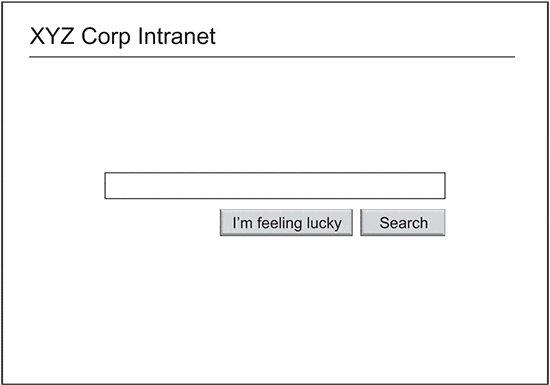
Let’s take this thought experiment to its natural conclusion, and create a Google-inspired intranet homepage. This might look something like the mockup at the top of the page.
Like Google, the intranet would start with an clean, white and uncluttered homepage. A search box would sit prominently at the centre of the page, inviting staff to start entering their terms.
Behind the scenes, the whole intranet is indexed by the search engine, putting everything at the fingertips of the searcher.
This is a simple vision, but could it work in practice?
The limits of search
It is useful to distinguish between two types of tasks that staff may be trying to complete on the intranet. The first is searching for a ‘known item’, the other seeking an ‘unknown item’.
In the first situation, they know exactly what they want, and are able to type this into the search engine. Voila, the page is found!
In the second situation, however, the task is less clear. They may know there is something relevant in HR about their situation, but don’t know the exact terms to use.
This is the limit of search: it only provides users with a blank field, giving no clues about what to type into it.
Benefits of navigation
Navigation is therefore very useful when staff are seeking new information, relating to a general topic rather than specific terms. It also surfaces what is on the intranet, giving a clear indication of what can be found, and where to locate it.
Without navigation, staff would have no clue what to use the intranet for, or what it could offer them. This is the reason why the design shown above would be of no practical use.
Both search and browse
In practice, search vs browse is a false dichotomy. Intranets need great search and great navigation.
Intranet teams should work on both, also recognising that it isn’t possible to deliver good search without a well-structured intranet to index.

Tags: homepages, information architecture, intranets, search

James Robertson is the Managing Director of
8 Comments:
Hi James – funnily enough, about 5 years ago when the trend was to try to emulate everything Google did, we discussed doing just this with our intranet homepage – we even did a trial of Google inside. Needless to say, it didn’t work and it never happened!
Richard
You are so right – I’ve had an executive ask for exactly this. I work in the public service, but I find, as I move from one department to the next, that common entitlements are called by quite different names. So if you are looking for ‘salary sacrifice’ you are not going to find it, if it’s called ‘salary packaging’.
I’ll keep this article handy for the next time I have this question.
Interesting thoughts! Though this article by Gerry McGovern suggest navigation is still very important: http://tinyurl.com/367e3cj
While a good search tool is critical to Intranet success, so is a strong navigation taxonomy. The reality is that people find information in different ways. Some people like to search, others like to navigate. My experience is that the best Intranets use a hybrid approach that give users a strong search engine as well as clear navigation opportunties.
Great article!
–Sean
@seanrnicholson
Good article, as James says a searchbox only is not of practical use in an intranet.
Actually, the answer to these very senior stakeholders is very simple. An intranet is not only to pull content (which the searchbox could cater for), but also to PUSH content (especially the stories of these senior stakeholders). And that can’t be done with a search-box.
Funny! This article seems to have sparked some interest. :-) These issues are very clear for us, as intranet professionals, but the challenge remains to find good arguments for senior management and stakeholders…
While what is being asked for is inappropriate, the underlying desire for something simple is valid. It’s probably important to acknowledge that desire and then work on how it is implemented – which probably won’t be the Google homepage.
One point to make with stakeholders is that website owners spend huge amounts of money to make their sites findable by Google – there’s this little industry called SEO that some of you may have heard of ;-)
If they want a Google type solution are they willing to give their intranet site owners similar budgets to make their properties search-friendly? Generally the answer will be “no”.
Thanks for the post, James.
You’re quite right about striving to merge search and browse. That’s something I write about in my book (http://oreilly.com/catalog/9780596528102) and have talked about in webinars (e.g., http://www.rosenfeldmedia.com/webinars/web-navigation).
The scent of information theory predicts that rich navigation options will increase performance, particularly for unknown item seeking. Recently, I recommended making the homepage of an intranet like a sitemap. Of course, there’d be a search too, but it seems reasonable to make the intranet homepage function more like an index than anythng else.
Intranet usability is different from web usability. SEO is different, as is the target user group and typical behaviors. The assumption that a Google-like search–even if it’s the Google search engine–can work the same on an intranet as on the open web is misguided.
4 Trackbacks
[...] also, another opinion by the guys at StepTwo: Just search? 19/04/2010 | | No Comments [...]
[...] James Robertson se la prende con quelli che esordiscono con affermazioni ingenue tipo: “perché la nostra intranet non può avere un’interfaccia come Google, con solo il motore di ricerca”? Insomma, nelle intranet basta la ricerca? [...]
[...] Wir halten es hier mit James Robertson: In practice, search vs browse is a false dichotomy. Intranets need great search and great [...]
[...] James Robertson – einer der weltweit bekanntesten Intranet Berater – sagt hierzu: Without navigation, staff would have no clue what to use the intranet for, or what it could offer them. [...]