



Filed under: Content management, Intranets, SharePoint
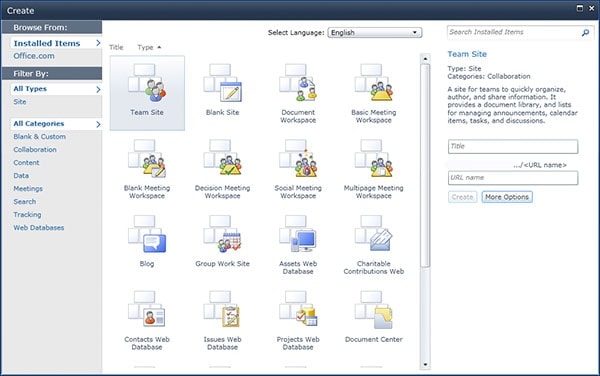
When you want to create a new site in your SharePoint intranet, this is the page you’re presented with. It’s pretty daunting for an inexperienced site administrator or content owner:
Should I create a team site or a document workplace?
Would a social meeting workplace be more relevant than a decision meeting workspace?
Maybe I need a blog?
Perhaps just start with a blank site and build from there?
This dialog box gives few clues and little guidance. While nothing is ever set in stone, picking the wrong initial choice will reduce the chances of successful adoption and use.
While this kind of complexity is common across many products, not just SharePoint, it generally leads to patchy and inconsistent intranets that are cluttered with under-used sites.
There are three strategies that can be taken:
- governance
- site creation workflows
- training and support
1. Governance
As discussed in Collaboration Roadmap written by Michael Sampson, it’s important to be clear about who has the rights to actually create a new site on your SharePoint intranet. Will every user be able to create a new site, or will this be restricted to a handful of central administrators?
While there is no one right answer, what’s needed in all cases is good governance. This provide a set of basic guidelines and processes that cover:
- creating new sites
- maintaining and ultimately closing sites
- what functionality can be used
- the rights and authorities granted to site owners
The smaller the number of staff able to create sites, the less training and support is required. (Although the result may be a bottleneck that generates widespread frustration.)
2. Site creation workflows
Another approach is to put some structure around creating new sites. This can include a tailored workflow and approval process that guides users step-by-step through the necessary decisions.
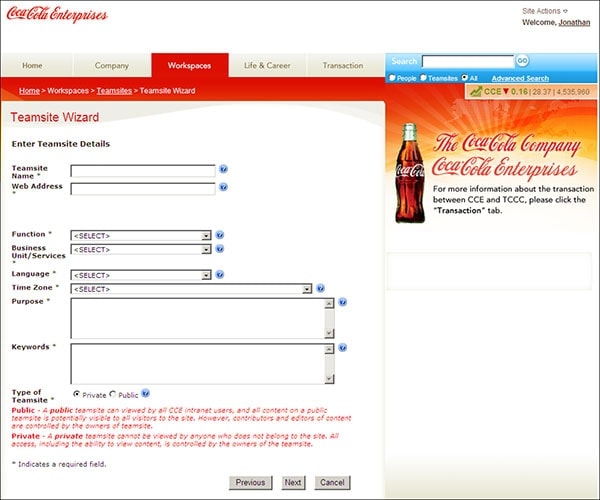
Screenshot courtesy of Coca-Cola.
For example, Coca-Cola in the US has created a “Teamsite Wizard”. This asks a number of key questions, with supporting help content. This makes it easier for staff to create a team site, while ensuring that important information is collected about each site.
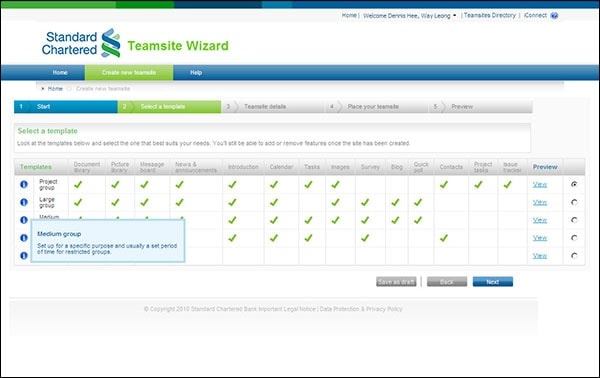
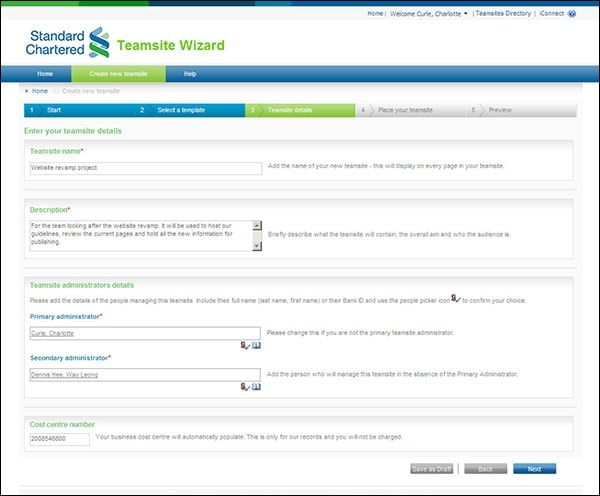
Screenshots courtesy of Standard Chartered.
Standard Chartered in the UK goes a step further, creating a fully-fledged process that actively guides staff towards the right choices. Governance is covered off early in the process, and then the user is helped to choose the right template. Key details are then collected for the new site, before going into an approval workflow.
These types of approaches help to put structure around site creation, and are particularly appropriate in larger SharePoint intranet deployments where there is inherently less control around creating new areas.
3. Training and support
SharePoint is a new tool for most, and users will be unfamiliar with what it can do, and how to do it. One of the most obvious ways of addressing this knowledge gap is through training and support.
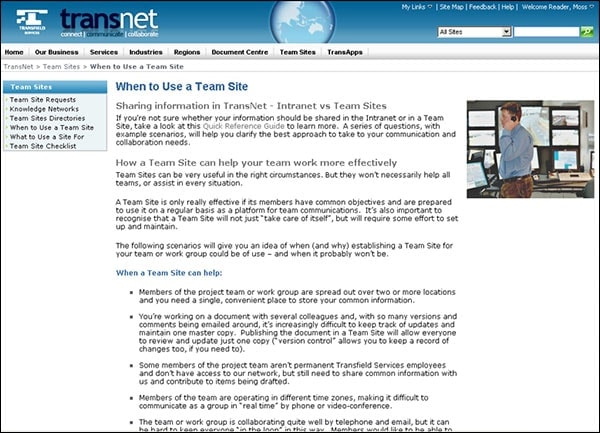
The work done by Transfield Services, showcased in the Governance and support for SharePoint teamsites report, provides a great example.
Extensive training materials are provided online, written in plain language, and supported by short training videos. Following the learning curve of new administrators, information is provided in bite-size chunks, with links to more in-depth materials where required.
While there is a growing body of excellent third-party training materials and books, Transfield chose to create custom documentation to match the specific functionality they’d turned on (and avoiding the features they turned off). This led to a highly successful deployment, with excellent levels of adoption and use.
Consider all three options
The options presented are not either-or. As the size and scale of a SharePoint intranet increases, it becomes vital to establish all three elements. Even when the IT team pre-creates a set of tailored template choices, users can still struggle to choose the right option.
Look for best practices established by other organisations, and set aside resources to make your SharePoint deployment successful, beyond just turning on the technology and hoping for the best.
What have you seen work?
What have you done on your SharePoint intranet?