

 BEST PRACTICE ARTICLE
Architects tools from Shutterstock




Filed under: Articles, Usability
Organising functionality and content into a structure that people are able to navigate intuitively doesn’t happen by chance. Organisations must recognise the importance of information architecture or else they run the risk of creating great content and functionality that no one can ever find.
This article provides an introduction to information architecture, discusses the evolution of the discipline and provides a 9-step guide for how to create an effective information architecture.
It also discusses the relationship between information architecture and usability, in the context of real-world projects.
The problem: finding is the new doing
Computer systems used to be frustrating because they did very little quite badly. People using systems became frustrated because they simply weren’t capable of doing what they were required to do.
But technology has progressed and now technology can do practically whatever people want it to do. So why doesn’t everyone using a computer have a large smile on their face?
The shear wealth of functionality and information has become the new problem. The challenge facing organisations is how to guide people through the vast amount of information on offer, so they can successfully find the information they want and thus find value in the system?
Intuitive navigation doesn’t happen by chance
The cost of failure
Not only is this extremely frustrating for users, but it has serious repercussions for organisations.
- For intranets it means low adoption rates and staff reverting to unsupported off-line resources.
- For websites with online shopping facilities it has a significant impact on revenue. Research suggests that a significant number of shopping attempts fail not because the user has evaluated the products on offer and decided against a purchase, but because the navigation system has failed and user can’t find the product they are interested in.
This problem is only set to get worse as the quantity of information available through sites increases. What can an organisation do to increase the chances that people can successfully navigate their site and find the information they require?
What is information architecture
Information architecture is the term used to describe the structure of a system, i.e the way information is grouped, the navigation methods and terminology used within the system.
An effective information architecture enables people to step logically through a system confident they are getting closer to the information they require.
Most people only notice information architecture when it is poor and stops them from finding the information they require.
Information architecture is most commonly associated with websites and intranets, but it can be used in the context of any information structures or computer systems.
The evolution of information architecture
The term “information architecture” was first coined by Richard Saul Wurman in 1975. Wurman was trained as an architect, but became interested in the way information is gathered, organised and presented to convey meaning. Wurman’s initial definition of information architecture was “organising the patterns in data, making the complex clear”.
The term was largely dormant until in 1996 it was seized upon by a couple of library scientists, Lou Rosenfeld and Peter Morville. They used the term to define the work they were doing structuring large-scale websites and intranets.
In Information Architecture for the World Wide Web: Designing Large-Scale Web Sites they define information architecture as:
- The combination of organisation, labelling, and navigation schemes within an information system.
- The structural design of an information space to facilitate task completion and intuitive access to content.
- The art and science of structuring and classifying web sites and intranets to help people find and manage information.
- An emerging discipline and community of practice focused on bringing principles of design and architecture to the digital landscape.
Today Wurman’s influence on information architecture is fairly minimal, but many of the metaphors used to describe the discipline echo the work done by architects. For example, information architecture is described as the blueprint developers and designers use to build the system.
Common problems
The most common problem with information architectures is that they simply mimic a company’s organisational structure.
Although this can often appear logical and an easy solution for those involved in defining the architecture, people using systems (even intranets) often don’t know or think in terms of organisational structure when trying to find information.
How to create an effective information architecture
An effective information architecture comes from understanding business objectives and constraints, the content, and the requirements of the people that will use the site.
Information architecture is often described using the following diagram:
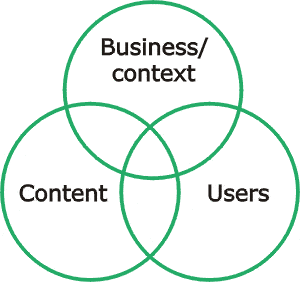
Business/Context
Understanding an organisations’ business objectives, politics, culture, technology, resources and constraints is essential before considering development of the information architecture.
Techniques for understanding context include:
- Reading existing documentation
- Mission statements, organisation charts, previous research and vision documents are a quick way of building up an understanding of the context in which the system must work.
- Stakeholder interviews
- Speaking to stakeholders provides valuable insight into business context and can unearth previously unknown objectives and issues.
- For further information about stakeholder interviews, see our article “Selecting staff for stakeholder interviews“
Content
The most effective method for understanding the quantity and quality of content (i.e. functionality and information) proposed for a system is to conduct a content inventory.
Content inventories identify all of the proposed content for a system, where the content currently resides, who owns it and any existing relationships between content.
Content inventories are also commonly used to aid the process of migrating content between the old and new systems.
Effective IA must reflect the way people think
Users
An effective information architecture must reflect the way people think about the subject matter. Techniques for getting users involved in the creation of an information architecture include:
- Card sortingCard sorting involves representative users sorting a series of cards, each labelled with a piece of content or functionality, into groups that make sense to them. Card sorting generates ideas for how information could be grouped and labelled.
For further information about card sorting, see the article “Card sorting a definitive guide“
- Card-based classification evaluationCard-based classification evaluation is a technique for testing an information architecture before it has been implemented.
The technique involves writing each level of an information architecture on a large card, and developing a set of information-seeking tasks for people to perform using the architecture.
For further information about card-based classification evaluation, see the article “Cardbased classification evaluation“
Styles of information architecture
There are two main approaches to defining an information architecture. These are:
- Top-down information architectureThis involves developing a broad understanding of the business strategies and user needs, before defining the high level structure of site, and finally the detailed relationships between content.
- Bottom-up information architectureThis involves understanding the detailed relationships between content, creating walkthroughs (or storyboards) to show how the system could support specific user requirements and then considering the higher level structure that will be required to support these requirements.
Both of these techniques are important in a project. A project that ignores top-down approaches may result in well-organised, findable content that does not meet the needs of users or the business. A project that ignores bottom-up approaches may result in a site that allows people to find information but does not allow them the opportunity to explore related content.
Take a structured approach to creating an effective IA
Creating an effective information architecture in 9 steps
The following steps define a process for creating an effective information architectures.
- Understand the business/contextual requirements and the proposed content for the system. Read all existing documentation, interview stakeholders and conduct a content inventory.
- Conduct cards sorting exercises with a number of representative users.
- Evaluate the output of the card sorting exercises. Look for trends in grouping and labelling.
- Develop a draft information architecture (i.e. information groupings and hierarchy).
- Evaluate the draft information architecture using the card-based classification evaluation technique.
- Don’t expect to get the information architecture right first time. Capturing the right terminology and hierarchy may take several iterations.
- Document the information architecture in a site map. This is not the final site map, the site map will only be finalised after page layouts have been defined.
- Define a number of common user tasks, such as finding out about how to request holiday leave. On paper sketch page layouts to define how the user will step through the site. This technique is known as storyboarding.
- Walk other members of the project team through the storyboards and leave them in shared workspaces for comments.
- If possible within the constraints of the project, it is good to conduct task-based usability tests on paper prototypes as it provides valuable feedback without going to the expense of creating higher quality designs.
- Create detailed page layouts to support key user tasks. Page layouts should be annotated with guidance for visual designers and developers.
Developing an information architecture in this way enables you to design and build a system confident that it will be successful.
There are many ways to document an IA
Products from the information architecture process
Various methods are used to capture and define an information architecture. Some of the most common methods are:
- Site maps
- Annotated page layouts
- Content matrices
- Page templates
There are also a number other possible by-products from the process. Such as:
- Personas
- Prototypes
- Storyboards
Each of these methods and by-products is explained in detail below.
Site maps
Site maps are perhaps the most widely known and understood deliverable from the process of defining an information architecture.
A site map is a high level diagram showing the hierarchy of a system. Site maps reflect the information structure, but are not necessarily indicative of the navigation structure.
Annotated page layouts
Page layouts define page level navigation, content types and functional elements. Annotations are used to provide guidance for the visual designers and developers who will use the page layouts to build the site.
Page layouts are alternatively known as wireframes, blue prints or screen details.
Content matrix
A content matrix lists each page in the system and identifies the content that will appear on that page.
Page templates
Page templates may be required when defining large-scale websites and intranets. Page templates define the layout of common page elements, such as global navigation, content and local navigation. Page templates are commonly used when developing content management systems.
Personas
Personas are a technique for defining archetypical users of the system. Personas are a cheap technique for evaluating the information architecture without conducting user research.
Prototypes can be used to bring an IA to life
Prototypes
Prototypes are models of the system. Prototypes can be as simple as paper-based sketches, or as complex as fully interactive systems. Research shows that paper-based prototypes are just as effective for identifying issues as fully interactive systems.
Prototypes are often developed to bring the information architecture to life. Thus enabling users and other members of the project team to comment on the architecture before the system is built.
Storyboards
Storyboards are another technique for bringing the information architecture to life without building it. Storyboards are sketches showing how a user would interact with a system to complete a common task.
Storyboards enable other members of the project team to understand the proposed information architecture before the system is built.
Information architecture and usability
Some people find the relationship and distinction between information architecture and usability unclear.
Information architecture is not the same as usability, but the two are closely related. As described in a previous KM Column (‘What is usability‘, November 2004), usability encompasses two related concepts:
- Usability is an attribute of the quality of a system:”we need to create a usable intranet”
- Usability is a process or set of techniques used during a design and development project:”we need to include usability activities in this project”
In both cases usability is a broader concept, whereas information architecture is far more specific.
Information architecture as an attribute of the quality of a system
An effective information architecture is one of a number of attributes of a usable system. Other factors involving the usability of a system include:
- visual design
- interaction design
- functionality
- content writing.
Information architecture as a process
The process for creating an effective information architecture is a sub-set of the usability activities involved in a project.
Although weighted to the beginning of the project, usability activities should continue throughout a project and evaluate issues beyond simply the information architecture.
Who creates the information architecture?
Increasingly companies are realising the importance of information architecture and are employing specialist ‘information architects’ to perform this role.
But information architecture is also defined by:
- intranet designers and managers
- website designers and managers
- visual designers
- other people designing information systems
- programmers
- librarians
- technical writers
Conclusion
It simply isn’t good enough for organisations to build functionality or write content, put it on their computer systems and expect people to be able to find it.
Developing an effective information architecture is an essential step in the development of all computer systems.
Effective information architectures enable people to quickly, easily and intuitively find content. This avoids frustration and increases the chance that the user will return to the system the next time they require similar information.
Remember: people can only appreciate what they can actually find.